

GEO audit process
If AI tools can’t name your business, you have a visibility problem even if Google already sends traffic. One 2026 study found ChatGPT recommended just 1.2% of nearly 350,000 business locations, while Google’s local 3-pack showed those same brands at 35.9%.
If I were auditing GEO for a small business, I’d focus on four things right away:
- Test AI visibility with 8 to 12 customer-style prompts
- Check page copy and schema so AI can pull facts fast
- Match business details across the site, GBP, maps, and directories
- Review citations, reviews, and outside mentions that AI tools use
Here’s the short version: a GEO audit is a check of whether ChatGPT, Gemini, Perplexity, and Google AI results can find, cite, and recommend a business with the right facts. I’d track three numbers: mention rate, accuracy rate, and primary recommendation rate.
A simple audit flow looks like this:
- Pick pages, prompts, locations, and tools
- Run prompt tests and check cited sources
- review content, schema, crawl access, and NAP match
- fix review gaps, bad listings, and weak third-party mentions
The main point is simple: AI visibility depends on clean facts, matching profiles, and pages that answer questions fast. I’d treat the website, Google Business Profile, reviews, and directory listings as one system – not separate tasks.
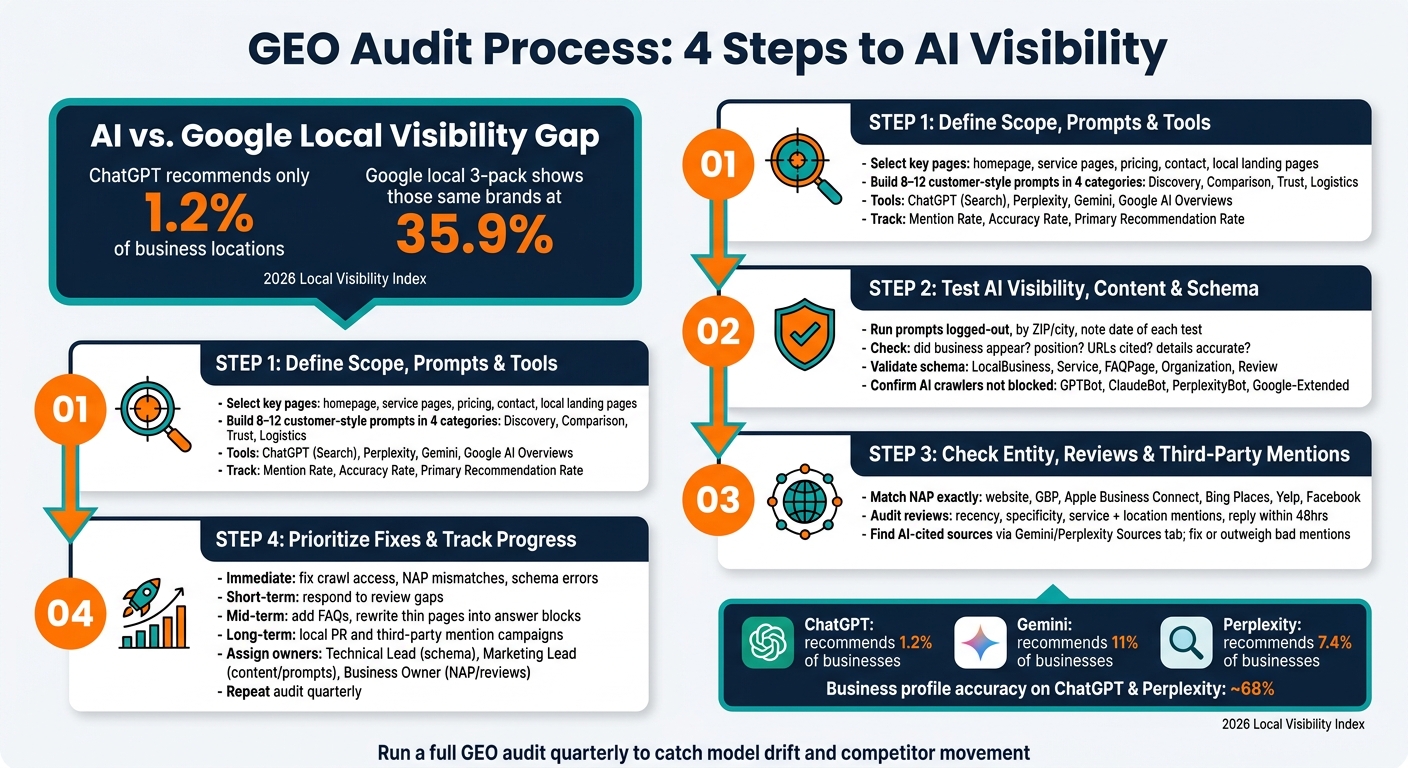
GEO Audit Process: 4 Steps to AI Visibility for Small Businesses
GEO Audit Explained: How Generative Engine Optimisation Improves Your Website for AI Visibility
sbb-itb-0a5855c
Step 1: Set up the audit scope, prompts, and tools
Before you test anything, decide which pages, which prompts, and which metrics you’re going to use. That keeps the audit focused and usable. It also gives you a clean baseline for Step 2.
Pick the pages and customer prompts to test
Start with the pages that matter most: your homepage, core service pages, pricing page, contact page, and local landing pages.
Next, build a prompt list that matches the way actual customers search. Group those prompts into four buckets:
- Discovery ("Best [service] in [city]")
- Comparison ("[Brand] vs. [Competitor] in [city]")
- Trust ("Is [Brand] reliable?")
- Logistics ("What are the hours for [Brand]?")
These prompts help you see whether AI can find, cite, and recommend your business.
A good target is 8 to 12 prompts total. Use the exact wording customers type. Skip internal jargon. It also helps to repeat the same core prompt for each city or ZIP code you serve. That makes it easier to spot location-based differences in how AI talks about your brand.
Record every test in the same format. If you don’t, it gets messy fast, and comparisons across pages, cities, and tools start to break down.
Collect baseline data and audit tools
Once your pages and prompts are set, pull the data you’ll use to measure results. Use Google Search Console for query and indexing data, a site crawler to map every indexable URL, and Rich Results Test to check schema validation.
Then test how AI platforms describe your business in practice. Run searches in ChatGPT (with Search enabled), Perplexity, and Gemini. Do each test both signed in and signed out, and note the exact city or ZIP code you’re simulating. AI responses can shift based on location and personalization history.
Record the date for every result too. That way, you can track changes in AI answers over time.
Define audit goals and success metrics
If your goals are fuzzy, your results will be too. Before you run a single test, decide what success means in plain numbers.
Track:
- Mention rate
- Accuracy rate
- Primary recommendation rate
These metrics tie straight to whether AI can find, cite, and recommend your business. Use them as your baseline before you make any fixes.
With scope and metrics in place, you’re ready for the on-page and structured-data checks.
Step 2: Check AI visibility, content clarity, and structured data
Test prompt coverage and citation accuracy
Use the same prompts and locations from Step 1 to see how each AI tool talks about your business. Run those searches in ChatGPT (with Search enabled), Perplexity, Google Gemini, and Google AI Overviews. Use a logged-out session set to the ZIP code or city you serve, and note the date of each run so you can compare changes as models shift over time.
For each prompt, track:
- Whether your business appeared
- Where it showed up in the answer
- Which URLs the AI cited
- Whether the details are right, including hours, address, phone number, services, and prices
If an AI tool cites an old source, fix that source or put more weight behind the page you want it to use.
According to the 2026 Local Visibility Index, ChatGPT recommended only 1.2% of nearly 350,000 business locations analyzed, compared to 11% for Gemini and 7.4% for Perplexity, with business profile accuracy on ChatGPT and Perplexity sitting at roughly 68%. So if an answer is wrong or thin, don’t just blame the model. Look at the page itself and ask a simple question: does it give AI enough clean facts to pull from?
Review page clarity for AI extraction
AI systems tend to prefer pages they can use almost like a ready-made answer. That means weak AI output often points to weak page structure, not just poor model behavior. Put the answer up front on every service and location page, ideally in the first two sentences. Then keep the rest of the page tight and easy to scan, with short sections under clear subheadings – around 120 to 180 words each.
Each service page should spell out five core details:
- What the service is
- Who it is for
- Where it’s available
- What it costs, or the usual price range
- How long it takes
Skip vague promo copy. Specific facts do a much better job here.
Once the copy is clean, check that your structured data backs up those same details.
Validate schema and business data consistency
Use Rich Results Test to check the schema types AI tools tend to rely on most.
| Schema Type | Key Details to Validate | Why It Matters for AI |
|---|---|---|
| LocalBusiness | Name, address, phone, hours, geo-coordinates | Confirms physical location and availability |
| Service | Service name, description, area served, price range | Matches user queries to what you offer |
| FAQPage | Question and answer pairs | Lines up with the way people write prompts |
| Organization | Logo, brand name, social profiles | Helps define your brand identity and authority |
| Review | Reviewer name, date, rating, review text | Gives machine-readable trust signals |
Keep NAP exactly the same across your site, Google Business Profile, and directory listings. Then make sure bots can reach those pages at all.
Check your robots.txt file and security settings like Cloudflare to confirm you aren’t blocking AI crawlers such as GPTBot, ClaudeBot, PerplexityBot, or Google-Extended.
If AI can access your pages but still doesn’t surface your business, move on to entity consistency, reviews, and third-party mentions.
Step 3: Check entity signals, reviews, and third-party mentions
Once your site facts and schema are clean, the next step is to see whether the rest of the web backs up that same business identity.
Check brand entity consistency across the web
When your site is clear and crawlable, look at your off-site profiles and make sure they confirm the same business details. AI systems often compare your website with profiles on Google Business Profile, Apple Business Connect, Bing Places, Yelp, and Facebook.
Your contact page or location page should act as the source of truth. The business name, address, phone number, website, hours, and category should match across every profile.
One simple way to spot issues is to search your business name and phone number in a private browser window. Then compare the results across Google Maps, Apple Maps, and Bing Maps side by side. Check for things like the wrong category, old hours, or a missing booking link.
Audit review signals and reputation detail
Once identity is lined up, look at the trust signals that shape AI confidence.
Focus on reviews that are recent and specific. Ask customers to mention the service, the location, and the outcome. If a review is negative, reply within 48 hours. Keep reviews active on Google and on the industry directories that matter for your business.
Find missing or inaccurate third-party mentions
Then audit the outside sources AI tools are most likely to cite.
Most AI citations come from third-party sources, not from your site. Search your business name in Gemini or Perplexity, open the Sources or References tab, and check what shows up. If you find old directory listings, forum posts, or news mentions with bad info, fix them or publish enough better sources to outweigh them.
| Audit Area | What to Check | Where to Look |
|---|---|---|
| Reputation | Review volume, recency, specificity, rating | Google Reviews, Yelp, industry directories |
| Citations | Third-party mentions, local news, forums | Gemini/Perplexity Sources or References tab, Reddit, local press |
| Geography | Service areas, neighborhoods, landmarks | Location pages, GBP service area settings |
Step 4: Turn audit findings into a GEO action plan and checklist
Prioritize fixes by impact and effort
Use what you found in Steps 1 to 3 to sort fixes by impact and effort. Start with crawl access and accurate business data. If a site or listing isn’t eligible to be understood correctly, content updates can wait.
| Priority | Fix Category | Example Actions |
|---|---|---|
| Immediate | Crawl access & data accuracy | Fix crawl access, NAP mismatches found in the audit, and schema errors found in the audit. |
| Short-term | Reputation & trust | Respond to review gaps |
| Mid-term | Content depth | Add service-specific FAQs, rewrite thin pages into clear answer blocks |
| Long-term | Third-party mentions | Launch local PR and mention campaigns |
This order keeps the work grounded in what moves the needle first. A polished page won’t help much if crawlers can’t reach it or if your business details don’t match across the web.
Build a GEO audit checklist and issue tracker
Once you’ve ranked the fixes, assign each one to an owner and track it in one issue log. That’s the part many teams skip. And it’s usually where good audits stall out.
A checklist only works when each item has a clear owner. For small teams, that usually looks like this:
- A technical or web lead handles schema and crawl access
- A marketing or content lead runs prompt tests and rewrites pages
- The business owner manages NAP consistency and review responses
Use simple metrics to measure progress across the audit:
| Audit Area | Checklist Item | Success Metric | Owner |
|---|---|---|---|
| Prompts | Run the same 8 to 12 prompts across ChatGPT, Gemini, Perplexity, and Google AI Overviews | Appear in relevant responses | Marketing Lead |
| Content | Convert vague marketing copy into factual, citable answer blocks | AI citation rate increase | Marketing Lead |
| Entity | Match NAP exactly across website, GBP, and major aggregators | 100% accuracy across top 20 profiles | Business Owner |
| Schema | Validate LocalBusiness, FAQPage, and Service markup |
Zero errors in Rich Results Test | Technical Lead |
| Reviews | Ensure reviews mention specific services and locations | Higher mention rate in recommendation answers | Business Owner |
Track each issue in a simple spreadsheet with the issue description, owner, current status, and expected impact. Keep it plain. If your team can scan it in 30 seconds, you’ll use it. If it turns into a giant project board, people tend to ignore it.
Run a full audit quarterly to catch model drift and competitor movement.
Conclusion: Key steps that improve AI visibility
After the audit is ranked and tracked, the next step is execution. Audit, fix, and repeat quarterly. This gives you a repeatable process for improving AI discovery, citation, and recommendation.
FAQs
How long does a GEO audit take?
It depends on how deep you go.
A quick self-audit can take as little as 15 minutes. A more focused review usually takes about 1 hour.
For a mid-sized website, a full audit often takes 1 to 2 weeks, depending on how many pages you have and how many third-party directories need checking. After that, it’s best to repeat the full review every quarter.
What tools do I need for a GEO audit?
Use a mix of hands-on testing and tracking tools. Check your top queries in an incognito browser, use a VPN to simulate local search, and review results in ChatGPT, Gemini, Perplexity, and Google AI Overviews.
It also helps to use tools for structured data, crawl checks, citation audits, AI visibility monitoring, and analytics. That includes Google’s Rich Results Test, the Schema.org validator, robots.txt checks, citation platforms, and GA4.
How often should I run a GEO audit?
Treat your GEO audit as a repeatable habit, not a one-and-done task.
Most experts suggest a quarterly full audit so you can track progress and adjust to model updates. Then, between those deeper reviews, run a smaller weekly or monthly check. That lighter pass helps you spot-test prompts, review recent mentions, and keep an eye on shifts in your business profile or review sentiment.
