
Knowledge Graph optimization
If Google can match your business details across your site and other profiles, you have a better shot at showing a brand panel in search. The work is simple: use one business name, one address, one phone number, one website URL, one logo, and one short description everywhere Google can find them.
Here’s the short version:
- I make my business facts match across my website, Google Business Profile, LinkedIn, Crunchbase, and directories.
- I use Schema.org markup to label my business, services, and founder in a way Google can read.
- I connect profiles with
sameAslinks and keep one fixed@idfor the business. - I use my About page as the main facts page for my company.
- I check branded searches, Search Console, and profile data every quarter to catch errors.
A few facts matter here. Google’s Knowledge Graph stores billions of facts about billions of entities. That means small mismatches – like “LLC” on one profile and no “LLC” on another – can slow down how Google ties your brand together. Even one old phone number can cause problems.
What I’m doing here is not keyword work first. It’s entity work. I’m helping Google understand that my business, my founder, my services, and my profiles all point to the same company.
If I had to boil it down to one rule, it would be this: <u>pick one version of your business identity and use it everywhere</u>.
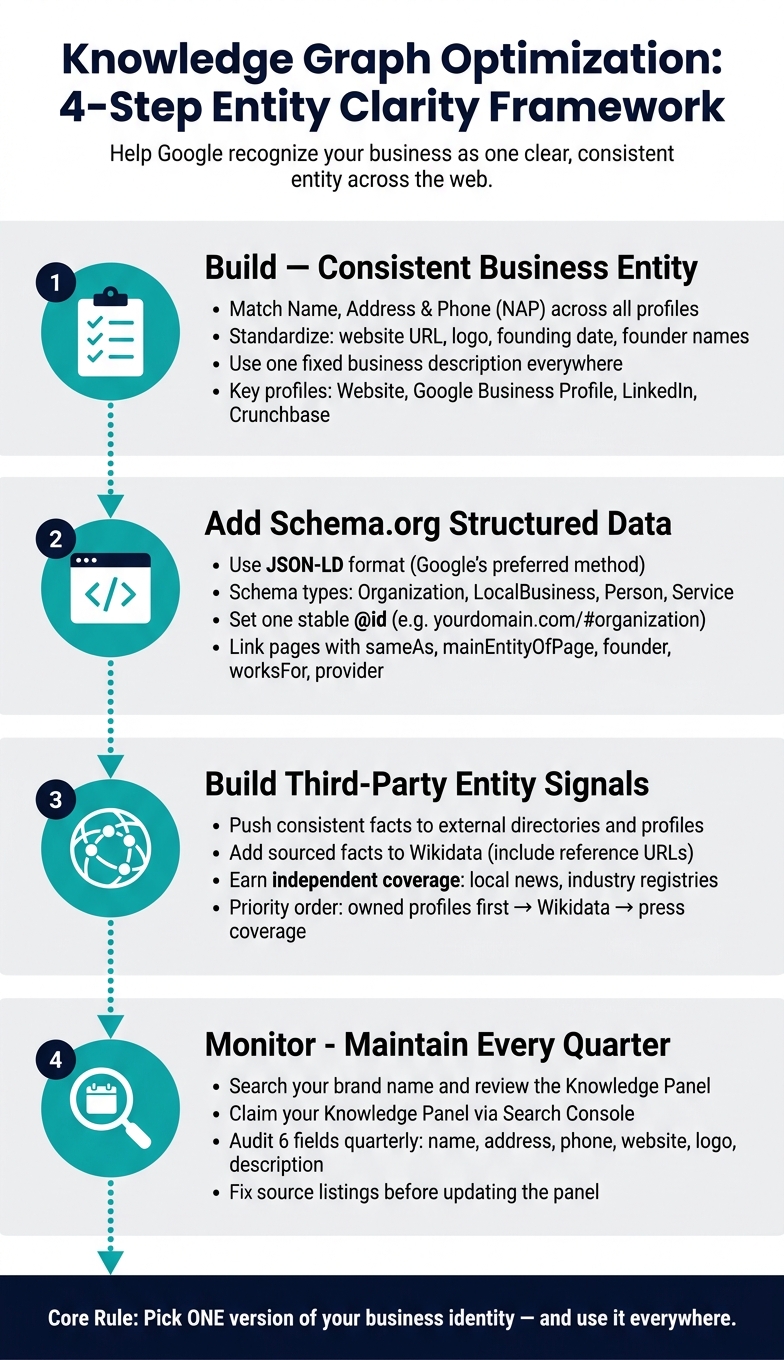
Knowledge Graph Optimization: 4-Step Entity Clarity Framework
KGMID SEO: Optimising Your Knowledge Graph
sbb-itb-0a5855c
Build a clear business entity across your website and profiles
Google looks at your website, directory listings, social profiles, and third-party mentions as a group. When those facts line up, Google can treat them as one clear business entity. That helps it figure out whether your business should have a stable Knowledge Graph entry. Once you’ve lined up the basics on your site, carry that same version across every profile Google can crawl.
Use one consistent version of your business details
Start by matching your name, address, and phone number across your website, Google Business Profile, and trusted directories. Then standardize your website URL, logo, founder names, and one short business description.
Small differences can create confusion fast. If one profile says "Green Forest Marketing LLC" and another says "Green Forest Marketing", Google has to decide whether those are the same company. The same problem shows up with different phone formats or mixed founding details.
When addresses, dates, and descriptions don’t match, even qualified businesses can miss out on a Knowledge Panel.
| Detail Category | Specific Data Points to Standardize |
|---|---|
| Basic NAP | Business name, physical address, phone number |
| Digital Assets | Website URL, logo URL, social media profile handles |
| Administrative | Legal name, founding date, founder/CEO names |
| Categorization | Industry category, one short business description |
Next, put those facts on one page that Google can use as the main reference.
Create an About page that serves as your main business facts page
Your About page, or a dedicated Company page, should act as the main source for your business facts. List your name, location, services, founding date, and leadership in plain English.
Then connect the organization to its founders with Person schema and link to your official profiles with sameAs. That gives Google a cleaner way to connect your business, the people behind it, and the services you offer as one entity.
Example: Defining Green Forest Marketing as a business entity
Here’s what that looks like for Green Forest Marketing. Entity clarity comes from matching the agency name, founder Justin Larson, and core services across the site and official profiles.
On the About page, include a factual description of the agency’s work and name Justin Larson as founder. Then use schema markup to link him to the organization with the founder property. Those same facts should also show up on official profiles like LinkedIn and Crunchbase, so Google can confirm the founder relationship from more than one source.
Add Schema.org structured data to support entity clarity
Once your business facts match across your site and profiles, the next move is to make those facts easy for machines to read. Schema.org structured data gives Google a clean version of your business details so it can connect your company name, founder, services, and location to the same entity. Put simply, schema is the machine-readable version of the facts already on your site. If your About page is the human source of truth, schema is the version built for search engines.
JSON-LD is Google’s preferred Schema.org format because it stays separate from page HTML.
Choose the right schema types for your business
Use schema types that match the entity you want Google to understand. For a U.S. small business, these are the main ones:
| Schema Type | Best Use Case | Best for |
|---|---|---|
| Organization | National or global brands | Supports brand-level Knowledge Panels; establishes broad brand authority |
| LocalBusiness | Physical storefronts or service-area businesses | Supports local entity visibility in Search and Maps |
| Person | Founders, CEOs, authors, or key executives | Builds E-E-A-T and personal brand authority; connects leadership to the brand; needs strong third-party corroboration for visibility |
| Service | Specific service offerings | Helps AI engines understand specific brand capabilities; must be linked to a provider or brand entity to be effective |
A digital marketing agency like Green Forest Marketing would usually use Organization as its main type. Then it can add Service markup for offers like SEO campaigns, website design, and lead generation systems.
Use key properties to connect your entity signals
Start with one stable @id, then have related pages point back to it. The two most important entity-first properties are @id and sameAs. mainEntityOfPage tells Google which page serves as the main source for the entity.
@id works like a fixed identifier for your business. A URL with a fragment is a common setup, such as https://greenforestmarketing.com/#organization. Once you set that, other pages across your site can reference the same entity without repeating the full schema block. That helps cut down on mixed signals.
sameAs connects your entity to outside profiles that back it up. Focus on Wikidata, LinkedIn, Crunchbase, and other verified profiles your business controls or can support.
Beyond that, details like logo, address, telephone, founder, and service descriptions should match the visible text on the page. If the schema says one thing and the page says another, Google has more to sort out, and entity confidence can drop.
Apply schema to Green Forest Marketing service pages
For Green Forest Marketing, use one organization node on the About page and service nodes on each service page. The About page should carry Organization schema with @id set to https://greenforestmarketing.com/#organization, sameAs pointing to LinkedIn and other verified profiles, and founder linking to a Person entity for Justin Larson.
Justin’s bio page should then use Person schema with a worksFor property pointing back to that same @id. Service pages for offers like SEO campaigns, website design, and lead generation systems should each include Service markup with a provider property that references the organization’s @id.
That setup links the organization page, founder page, and service pages into one connected entity. For Google, that’s a lot easier to process because there are fewer gaps to reconcile when it reviews the brand for search features.
Build trust with consistent third-party entity signals
Once your site schema is lined up, push those same business facts to places Google already checks. Google doesn’t look only at your site. It compares your business details across outside sources too. That means off-site signals matter just as much as the schema on your own website.
Align your business facts across directories and profiles
The details that need to match everywhere are your business name, address, phone number, website URL, and business description.
For Green Forest Marketing, start with Google Business Profile, LinkedIn, and Crunchbase. Then carry those same facts into industry directories and any other profiles you manage.
One simple habit can save a lot of cleanup later: write one fixed, one-sentence business description and use it word-for-word across every profile. Do the same in Wikidata and any other authoritative profiles. If one listing says one thing and another says something a bit different, Google has more to sort out.
Use Wikidata and other sources with sourced facts
Wikidata is a structured data source Google can use to confirm your entity. Every statement you add – such as a founding date, headquarters location, or official website – should link to a reference URL. If a statement has no source, other editors can remove it.
Add the Wikidata URL to sameAs only after the item is sourced and stable.
It also helps to build support from independent sources like local news coverage and industry registries. Those sources matter because they confirm your business facts outside your own site. In plain English: it’s one thing to say who you are on your website, and another when outside sources say the same thing.
Compare external sources by control and validation strength
Start with the profiles you control. Then add sources Google can verify.
| Source | Validation Strength | Your Level of Control | Maintenance Effort |
|---|---|---|---|
| Wikidata | Very High | High (user-editable) | Medium – facts must be sourced |
| Google Business Profile | High | High (owner-controlled) | Moderate – periodic updates |
| LinkedIn / Crunchbase | High | High (owner-controlled) | Low – periodic updates |
| News / Press Coverage | High | Low (journalist-controlled) | High – requires PR effort |
| Industry Directories | Medium | High (owner-controlled) | Moderate – NAP audits needed |
A good order is simple: lock down the profiles you manage first, then add Wikidata as a machine-readable anchor. Independent coverage helps a lot too, but it usually takes more time to build than owned profiles.
Monitor and maintain your Knowledge Graph signals over time
Once your schema and profiles line up, the job isn’t done. You need to keep an eye on them.
Why? Because data drifts. An old phone number, a dated leadership note, or mismatched profile details can chip away at branded search visibility over time.
Use Knowledge Panel feedback and Google Search Console
Start by searching your brand name.
If a Knowledge Panel shows up, review the basics: category, logo, and core facts. Then click "Claim this knowledge panel" in the panel footer and verify ownership through Search Console or another official account Google accepts.
After you claim it, use the panel tools to update descriptions, images, and social links. If you spot a wrong fact, don’t just change the panel and hope for the best. Fix the source listing first. Google usually updates the panel after it recrawls that source.
Google Search Console helps you check whether those fixes are making a dent. In Performance, track branded-query impressions and clicks. In Rich Results, look for schema errors or coverage gaps that may block entity signals.
Run a quarterly entity audit for website and profile consistency
Every quarter, review your About page, Google Business Profile, LinkedIn, Crunchbase, and Wikidata using the same set of fields:
- name
- address
- phone
- website
- logo
- description
If anything doesn’t match, fix it right away.
Using the same checklist each quarter makes it much easier to spot changes fast. It’s a little like balancing your books. Small errors are easy to clean up early, but messy if they sit for months.
| Audit Element | Common Issue | Recommended Fix |
|---|---|---|
| Business Name | Inconsistent naming (e.g., "Acme" vs. "Acme Inc.") | Pick one canonical name and use it across all profiles and schema |
| NAP Data | Outdated address or phone number on third-party directories | Standardize NAP across authoritative directories like Yelp, BBB, and LinkedIn |
| Structured Data | No schema detected in Rich Results Test | Re-implement JSON-LD Organization schema on the homepage and validate |
| Knowledge Panel | Incorrect logo or missing social links | Claim the panel and update logo and sameAs properties in website schema |
| Wikidata | Missing or incomplete entity entry | Update the item with official website, industry, and founder facts |
Conclusion: Core actions that improve Knowledge Graph visibility
Knowledge Graph optimization comes down to one simple habit: keep ONE business identity consistent across your schema, profiles, and Knowledge Panel.
That means:
- publish accurate
OrganizationorLocalBusinessmarkup - keep
sameAslinks pointed at verified profiles - claim your Knowledge Panel when it appears
- run a quick quarterly audit to catch drift before it snowballs
Brands that show up cleanly in Google’s Knowledge Graph – and in AI-generated answers – tend to be the ones that make their entity easy for Google to read and confirm across the web. Consistency is what helps that visibility hold up over time.
FAQs
How long does Knowledge Graph optimization take?
Knowledge Graph optimization takes time. There’s no official application process, and there’s no guaranteed timeline, so most businesses should expect 3 months to 2 years.
If your business already has strong digital signals, you may see results in 3 to 6 months. If you’re a new entity or you operate in a crowded space, it can take up to 24 months.
You can’t force the process or move it along by hand. What helps is staying consistent with your entity data across sources, which can support faster verification.
Do I need both schema markup and profile consistency?
Yes. Schema markup defines your entity in a machine-readable format, while profile consistency gives Google outside confirmation that helps it trust that information.
On its own, schema is often not enough because it’s self-reported. Using both lets your site state what the entity is, while external profiles back that up.
What should I fix first if my brand details don’t match?
First, fix the source information Google uses to check your brand. If key details don’t match across trusted sources, Google may not connect your entity with confidence.
Audit and align your NAP, founding date, industry, and description across your website, Google Business Profile, Wikidata, LinkedIn, and Crunchbase. Then update your Organization schema with sameAs links to those matching profiles.

