

How Gemini chooses recommendations
If you want Gemini to mention your business, give it facts it can check. From the article, the pattern is simple: Gemini leans on clear prompts, matched business details, review text, site content, and clean data. And that matters because cited brands can get 35% more organic clicks and 91% more paid clicks, even though 93% of AI Mode searches end with no website click.
Here’s the short version in plain English:
- I see Gemini ranking suggestions by fit to the prompt
- I see it favoring business info that matches across sources
- I see brand websites playing a big role, with 52.15% of citations coming from brand-owned sites
- I see Google Business Profile mattering a lot, with 73% of cited sources tied to a verified profile
- I see reviews with details helping more than generic praise
- I see schema and clean reports helping Gemini check facts
- I see weak, mixed, or vague signals leading to generic answers or no mention at all
So if I had to boil the whole article down to one point, it would be this: Gemini does not reward guesswork. It tends to surface businesses and ideas that match the request, stay within limits like budget or location, and show the same facts across the website, Google Business Profile, reviews, and markup.
For a small business, that means the job is not just “do SEO.” The job is to make sure your services, hours, service area, pricing context, and proof points are easy to find and say the same thing everywhere. Add prompts with exact details, use MM/DD/YYYY dates, keep $ amounts consistent, and make your pages answer direct questions fast.
The article also shows four common recommendation buckets Gemini gives small businesses:
- Content ideas
- SEO fixes
- Campaign guidance
- Next-step actions
Each one pulls from a slightly different mix of signals. For example, content ideas lean more on topic coverage and short answer blocks. Campaign suggestions lean more on review themes and what your brand is known for. Local next steps lean more on hours, categories, and service areas.
If I were using this article as a checklist, I’d focus on these actions first:
- Write tighter prompts with location, budget, audience, and date range
- Match your website, GBP, and directory info
- Add or fix LocalBusiness, FAQ, and Service schema
- Get more reviews that mention specific services and locations
- Keep performance reports clean and easy to read
- Track which brands and sources Gemini cites month after month
That’s the whole idea in one line: Gemini recommends what it can verify, match, and support with data.
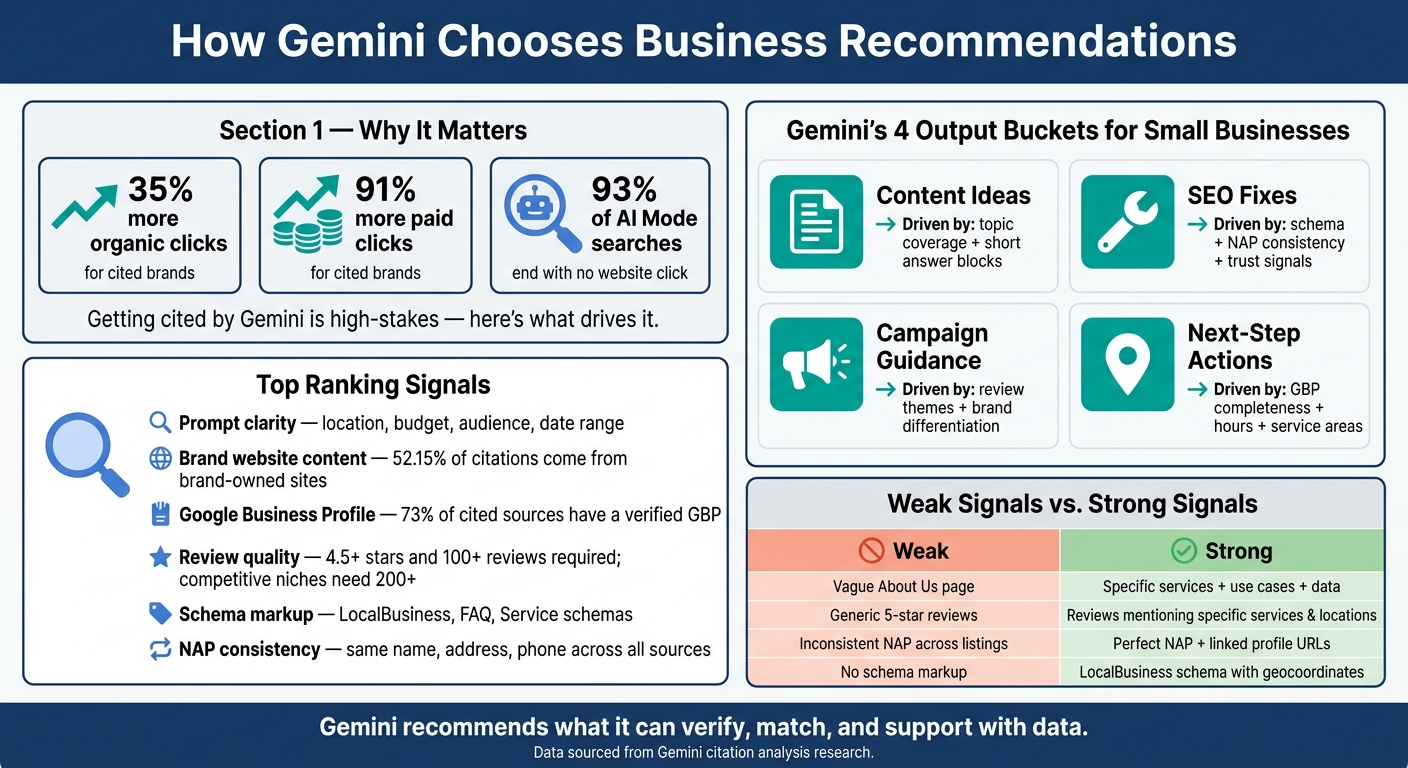
How Gemini Ranks & Recommends Small Businesses: Key Signals & Stats
How to Get Your Business Recommended by ChatGPT, Gemini & AI Search
sbb-itb-0a5855c
Core signals Gemini uses
Gemini looks at three main inputs: the prompt, business signals, and structured data.
Prompt clarity and stated goals
Specific prompts tend to lead to more relevant recommendations. Gemini may run several related searches from one prompt to cover different angles of your goal. If you type something broad like "help me with marketing", there isn’t much to go on.
A tighter prompt gives Gemini far more direction. For example, "suggest three Google Ads campaign ideas for a family-owned HVAC company in Denver targeting homeowners aged 35–55, with a budget of $1,500 per month, running 06/15/2026 to 09/30/2026" spells out the business, location, audience, budget, and timeframe in one shot.
Formatting matters too. U.S.-style details like dollar amounts, MM/DD/YYYY dates, and exact place names help Gemini read limits the right way instead of filling in blanks on its own.
Once Gemini has the goal pinned down, it leans on business and data signals to sort the best-fit recommendation.
Business context, website content, and reviews
For local recommendations, Gemini pulls from Google Business Profile, Maps, and other location data. It also puts a lot of weight on what your brand says about itself – 52.15% of Gemini’s citations come directly from brand-owned websites. That means your service pages, about page, and blog posts aren’t just there for SEO. They help shape what Gemini sees and repeats.
Then Gemini checks whether other signals back up those same claims. It reads review text, not just star ratings. Reviews that mention exact services or locations can strengthen your standing in those areas.
A few numbers stand out here:
- Businesses with 4.5+ stars and 100+ reviews are much more likely to be recommended.
- In more competitive categories, some businesses may need 200+ detailed reviews to appear with consistency.
Content that shows strong experience, expertise, authority, and trust signals is also more likely to be cited.
Performance data and clean data formats
Clean spreadsheets and reports help Gemini produce better recommendations. If the data is messy, Gemini has to guess. And that’s where things can go sideways.
For spreadsheet-based recommendations, Gemini needs data it can read cleanly:
- Clear column labels
- MM/DD/YYYY dates
- Consistent dollar values
That setup helps Gemini spot patterns and compare options instead of trying to patch missing context.
On the technical side, schema markup like LocalBusiness, FAQ, and Service gives Gemini facts it can check against your Google Business Profile. Your schema should match your Google Business Profile details – hours, address, and service areas – so the signals line up. If location mix-ups are possible, add latitude and longitude too.
Those inputs feed the ranking rules that decide which recommendation shows up first.
How Gemini ranks and selects recommendations
Once Gemini has the data, it sorts recommendations based on fit, confidence, and policy limits.
Fit for the prompt
After it gathers inputs, Gemini ranks by fit, not by how much information it has. Exact matches for hours, price, service area, or industry tend to move up first. Location, service area, and industry details help Gemini figure out which suggestions make the most sense for your request. A recommendation that matches your market and timing is more likely to appear near the top than a broad idea that could apply to almost anyone.
Usable, complete, and realistic
When more than one option fits, Gemini leans toward the one with the clearest support. It prefers data that is consistent and easy to verify, and it drops weak or conflicting signals, even if they seem related. Detailed source material usually ranks above vague alternatives, and suggestions with clear, practical detail usually rank above broad advice.
Practical limits matter too. If your prompt includes a budget, Gemini filters out strategies that don’t fit that range. The same goes for time limits and local market constraints. Missing details like service specifics, budget range, or target location create gaps, and those gaps often lead to more generic recommendations.
Safety and policy limits
Gemini filters some outputs before showing them. If a prompt touches on sensitive claims, financial guarantees, or regulated services, Gemini may soften, narrow, or leave out parts of the response. Policy filters also remove content that looks promotional or unverified. In plain English, Gemini tries not to push claims that promise too much or lack support, which matters for small businesses trying to make sound marketing choices.
These ranking rules shape which type of recommendation appears next.
Main recommendation types for small business marketing
Once Gemini scores fit and confidence, the suggestions it shows tend to fall into a few repeatable buckets. For small businesses, that usually means four types: content ideas, SEO fixes, campaign guidance, and next-step actions. The same ranking rules are in play across all four, but they show up in different ways depending on the task.
Content, SEO, and website recommendations
This category matters a lot for small businesses trying to improve their online presence. Gemini tends to favor related pages that fully cover one topic. It also leans toward short, direct answer blocks.
On service pages, that means plain specifics beat fluffy copy. Gemini tends to favor pricing ranges, process steps, and clear proof points that show why your business is different from generic competitors. Vague, adjective-heavy writing does less work than content built around clear, verifiable details.
Campaign, creative, and next-step recommendations
Campaign and creative suggestions lean more on review text and brand-specific signals. Gemini looks at repeated themes in reviews – like certain strengths, locations, or services – and uses those patterns to shape ad angles and positioning.
Next-step recommendations usually show up for local queries. In those cases, hours, service areas, and category data tend to matter most.
Comparison table: recommendation types at a glance
Use the table below to match each recommendation type with the signals that have the biggest effect on it.
| Recommendation Type | Typical Inputs Required | Key Ranking Factors | How to shape it |
|---|---|---|---|
| Content ideas | Service pages, blog posts, FAQ sections | Full topic coverage, short answer blocks | Build related pages on one topic |
| SEO improvements | JSON-LD schema, NAP data, internal links | Factual consistency, trust signals, factual density | Add LocalBusiness schema with geocoordinates |
| Campaign & creative | Review text, positioning details | User sentiment, brand differentiation, how often customers repeat the same strengths | Encourage customers to mention specific services or locations in reviews |
| Next-step actions | GBP categories, hours, service areas, regular posts | GBP completeness, proximity, Maps prominence | Post regular GBP updates and respond to all reviews |
How to align your business with Gemini’s recommendation logic
Standardize prompts and source materials
Treat the ranking signals above like a working checklist for your own inputs. Stick with one prompt template per query, then track three things over time: whether your business shows up, which sources Gemini cites, and which names keep showing up month after month. Run the same searches every month – phrases like "Best [Category] for [Specific Audience]" or "Top [Service] in [Location]" – and log the results.
Just as important, keep one master factsheet for your business. Your website, Google Business Profile, and directory listings should all match on name, services, hours, and location. Think of it this way: if Gemini can’t check a fact across sources, that fact is weaker. Your service pages, FAQ sections, and brand docs should all say the same thing in the same plain terms across every channel.
Strengthen online signals and organize performance data
For local visibility, your site and Google Business Profile need to tell the same story. 73% of sources cited in Gemini’s AI answers have a verified Google Business Profile. So fill out every field – categories, service areas, hours, and photos – and add weekly posts. Small details matter here. Your schema coordinates should match your map pin exactly, because exact geocoordinates help Gemini tell your business apart from others with similar names.
For campaign planning and next-step suggestions, clean performance data gives Gemini the layer it needs to work from. Pull channels, spend, leads, conversions, and revenue into one report. Use the same U.S. formatting across the board so the data is easy to read and compare.
Before-and-after table and key takeaways
Use the table below to find the weakest inputs first.
| Input Type | Weak | Strong |
|---|---|---|
| Business context | Vague "About Us" page with no specific service list | Structured "Why Choose Us" section with specific use cases and data |
| Source materials | Outdated PDFs and inconsistent service descriptions | Centralized brand docs, service summaries, and FAQ pages |
| Online signals | Inconsistent NAP across listings; no schema | Perfect NAP consistency and linked profile URLs with matching business details |
| Review presence | Sparse, generic 5-star ratings with no text | Detailed reviews mentioning specific services, locations, and outcomes |
The core idea is simple: Gemini recommends what it can verify. If your signals are messy, your data is thin, or your business details are unclear, you’re giving it a reason to skip you.
FAQs
Why does Gemini skip some businesses?
Gemini may skip businesses when Google’s ecosystem doesn’t give it enough solid signals. That usually means weak Search visibility, an incomplete Google Business Profile, inaccurate or thin reviews, or structured data that doesn’t line up across the web.
It also tends to favor businesses that have a clear presence in the Knowledge Graph. That includes strong entity clarity, schema markup, geocoordinates, and recent content that matches what people are looking for. When those signals are weak, mixed, or out of date, a business can be left out or pushed lower in the results.
How often should I update my business details?
Update your business details on a regular schedule, ideally every quarter, so your information stays current.
That helps with content freshness and lines up with Gemini’s preference for up-to-date information, especially on pages where details can change over time.
What kind of reviews help Gemini most?
The reviews that help Gemini most are detailed Google Reviews that show high volume, recent activity, and specific content.
What tends to matter most? Reviews that spell out actual use cases and clear outcomes. A vague “great service” doesn’t say much. A review that explains what the business helped with, what problem got solved, or what result the customer saw gives Gemini a lot more to work with.

